Record history
The Record history module provides a read-only log of all changes made to a record. It is an essential tool for auditing, traceability, and accountability, ensuring that every modification can be tracked over time. Users cannot edit the history directly — it is automatically generated by the system whenever a record is created, modified, deleted, or restored.
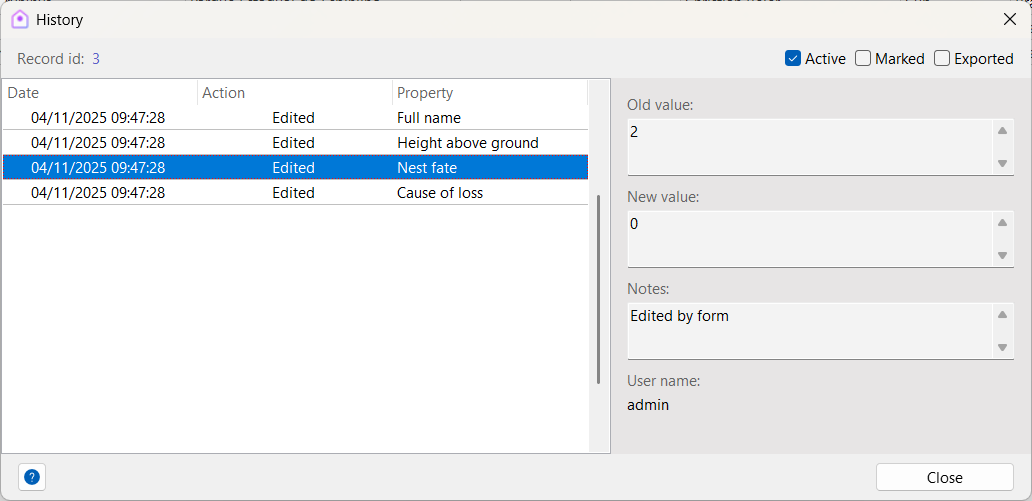
Fields
Each entry in the record history contains the following information:
| Field | Description |
|---|---|
| Date | Date and time of the event |
| Action | Type of action performed (see details below) |
| Property | Field or property that was edited |
| Old value | Value of the property before editing |
| New value | Value of the property after editing |
| Notes | Additional information about the event (optional) |
| Username | User who performed the action |
Actions
The following actions are tracked in the record history:
- Insert – A new record was created.
- Edit – An existing record was modified.
- Delete – A record was removed (sent to the recycle bin).
- Restore – A previously deleted record was restored.
Best practices
- Review history before editing: Check past changes to understand the context of a record.
- Audit regularly: Periodically review histories to ensure data integrity and compliance.
- Leverage usernames: Track who made changes for accountability in collaborative environments.
- Restore carefully: Use the restore action only when you are certain the record should be reactivated.
By maintaining a detailed record history, Xolmis ensures data reliability and transparency, supporting both scientific research and administrative management.